
DTF vs Other Methods
How Screen Printers Can Benefit from DTF Transfers: A Comprehensive Guide
Jun
How Screen Printers Can Use DTF Transfers to Expand Their Services
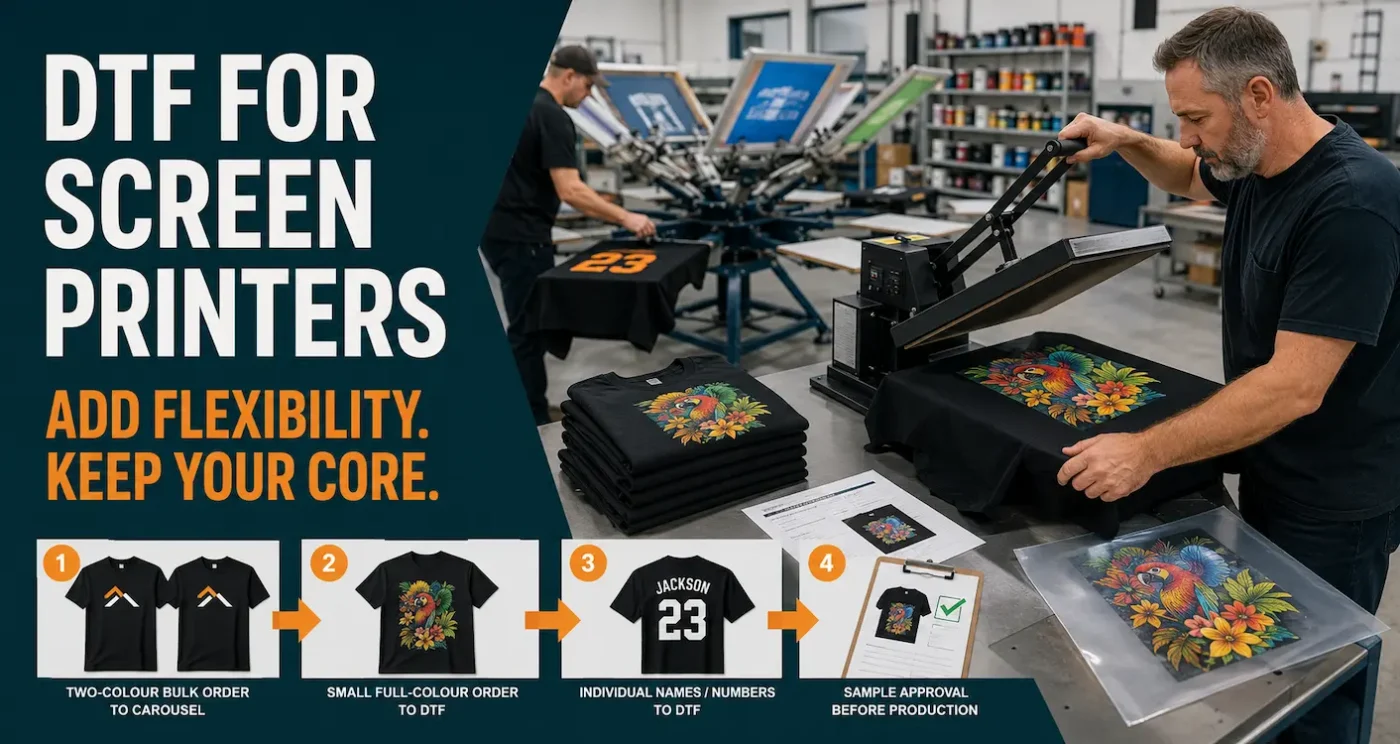
Direct-to-Film transfers do not need to replace screen printing. For an established print shop, ready-to-press DTF can operate as a companion process: use screen printing where its setup and production speed make sense, then use DTF for jobs that are awkward, slow or uneconomical to put on press.
This guide is informed by screen-printing experience dating back to the 1990s and by operating DTF Transfers Australia since 2020. It focuses on practical job routing, outsourcing and quality control rather than promising that every order becomes more profitable simply because DTF is available.
TL;DR: Where DTF Fits in a Screen-Printing Business
- Keep screen printing for suitable volume orders, simple spot-colour artwork and jobs already efficient on your press.
- Use ready-to-press DTF for short runs, one-offs, samples, complex full-colour artwork, gradients and photographic elements.
- DTF can help with names, numbers, replacement garments and small reorders without remaking screens.
- Outsourcing transfers lets you test demand without purchasing and maintaining a DTF printer.
- A reliable heat press, print-ready artwork, garment testing and recorded settings are still essential.
- DTF is not automatically the cheapest method; compare the complete job cost and production time.
- Large solid DTF prints can feel heavier and less breathable than artwork designed with open space.
- Specialty transfers require separate artwork and fitting tests before being offered to customers.
DTF Works Best as a Companion to Screen Printing
Screen printing remains a strong production method. Once screens are prepared and registered, it can be efficient for suitable volume orders, particularly when the artwork uses a limited number of colours. It also offers ink systems and finishes that are not identical to DTF.
DTF removes a different set of obstacles. A digitally printed transfer can carry multiple colours, gradients and fine detail without exposing one screen per colour. A screen printer can order the transfer, apply it with a heat press and avoid adding another wet-printing setup to the job.
The useful question is not “Which process wins?” It is “Which process gives this particular order the best balance of appearance, cost, turnaround and production risk?” Our detailed DTF versus screen-printing comparison covers the methods themselves; this article focuses on operating both options within one business.
Which Jobs Should Move to DTF?
A simple routing table helps sales and production staff make consistent decisions.
| Job characteristic | Likely starting method | Why |
|---|---|---|
| Large run with one or two spot colours | Screen printing | Screen setup can be spread across the quantity and production can be fast once running. |
| One-off or short run with many colours | DTF | No separate screen is required for every colour. |
| Gradients, detailed illustrations or photographic elements | DTF | Digital output can reproduce complex tonal information when the source artwork is suitable. |
| Simple artwork already separated and proven on press | Screen printing | Changing a successful production method may add cost without improving the result. |
| Individual names, numbers or small artwork variations | DTF | Different elements can be printed without creating a new physical screen for each variation. |
| Approval sample before a larger order | DTF for the sample, then reassess | A sample can be produced without committing to full screen setup, but it may not exactly match the hand feel of the later screen print. |
| Large solid print where breathability and soft hand are priorities | Test both methods | A large solid DTF area can feel heavier; artwork construction and ink system matter. |
| Unfamiliar polyester or coated garment | Test before accepting | Heat, dyes, coatings and adhesion can create risks regardless of the selected method. |
Quantity alone should not decide the method. Include artwork complexity, print size, garment, deadlines, colour expectations and finishing requirements in the decision.
Practical Ways Screen Printers Can Use Ready-to-Press DTF
Accept short runs without rebuilding the whole workflow
Customers increasingly ask for a few garments, a single sample or a replacement item. DTF lets a screen printer service those orders using the artwork and a heat press rather than setting up several screens for a very small quantity.
Add full-colour artwork to the sales offering
Detailed logos, gradients and photographic elements can be difficult to price competitively as a small screen-printing order. DTF gives the salesperson another route instead of rejecting the artwork or forcing it into fewer colours.
Produce names, numbers and changing information
Team names, staff roles, dates, sponsor changes and individual numbers can be arranged as separate transfers. This is useful when the base garment design is screen printed but variable information is added later with DTF.
Handle late additions and replacement garments
A customer may approve 100 garments and then request two more after the screens have been reclaimed. Keeping approved artwork and ordering replacement transfers can provide an alternative to remaking every screen, provided the customer understands that DTF and screen print will not be visually or physically identical.
Test new products before committing to inventory
Limited releases and new merchandise concepts can be produced in small quantities. If demand becomes consistent, the shop can reassess whether a larger screen-printed run is more efficient.
Fill unused space on gang sheets
When practical, related logos, neck labels, small replacement prints and future repeat designs can share a sheet. Crop every file tightly and keep a clear order record so saved transfers can be identified later. Use the DTF gang-sheet builder for suitable standard transfers.
Should a Screen Printer Outsource Transfers or Buy a DTF Printer?
Adding DTF to the sales list does not require immediately adding DTF printing to the factory floor. A screen-printing business can begin with outsourced, ready-to-press transfers and use its existing heat-press skills.
| Consideration | Outsource ready-to-press transfers | Print DTF in-house |
|---|---|---|
| Initial investment | Primarily a suitable heat press, workspace and application tools | Printer, ink system, software, film, adhesive system, curing equipment, ventilation and production space |
| Maintenance | The transfer supplier maintains the printing system | The shop owns cleaning, white-ink management, consumables, breakdowns and downtime |
| Production control | Dependent on supplier handling and freight or collection | More direct control when equipment, staff and consumables are operating correctly |
| Staff skills | Artwork preparation, ordering, heat pressing and quality control | All outsourced skills plus printer operation, colour, adhesive application, curing and maintenance |
| Best starting point | Testing customer demand and adding DTF without a new print department | Consistent proven volume that supports equipment, trained staff and contingency planning |
Do not compare only the transfer’s unit price with ink and film costs. Include labour, maintenance time, waste, cleaning materials, failed output, finance, floor space, environmental control and downtime. Our DTF printer buying guide covers these risks in more detail.
A Practical Ready-to-Press Workflow
- Qualify the order: Record quantity, artwork, print dimensions, garment style, colour, fabric, deadline and expected finish.
- Select the method: Compare screen printing, DTF and any other suitable process before quoting.
- Confirm print-ready artwork: Check size, resolution, transparency, spelling and minimum printable detail.
- Order the transfers: Use individual sheets or gang sheets based on the job and current product options.
- Inspect on arrival: Match the transfer to the order and check for shipping damage before pressing.
- Test the exact garment: Confirm adhesion, heat response, colour, hand feel and placement.
- Approve the process: Record temperature, time, pressure, peel method and final press.
- Run production consistently: Load each garment the same way and keep seams away from the application area.
- Perform quality control: Check placement, adhesion and appearance before folding or packing.
Current standard transfers use the Insta-Peel process, while specialty products may require a cold peel or other product-specific handling. Always use the current transfer fitting instructions rather than applying one setting to every transfer.
How to Quote DTF Work Without Guessing
A transfer price is only one component of the selling price. Build a repeatable costing model that reflects the complete job.
Minimum job cost = garment + transfer + inbound freight allocation + pressing labour + setup/admin + packaging + expected waste
Then add the gross margin required to operate the business. Include additional allowances where the job involves:
- individual names, sorting or variable artwork;
- multiple print positions;
- unpacking and repacking customer-supplied garments;
- specialty transfers or more difficult fitting;
- testing unfamiliar garments;
- urgent handling;
- artwork correction performed by your own business; or
- replacement risk on expensive garments.
Do not assume that “no screen setup” means “no setup cost”. Staff still need to check the order, prepare or verify artwork, separate transfers, test garments, align prints and inspect production.
Artwork Preparation and DTF Hand Feel
Ready-to-press output begins with a print-ready file. Supply a transparent PNG at 300 DPI or higher at the intended print size, crop it tightly and avoid isolated elements below approximately four pixels or 1 mm. Files are printed as supplied.
Screen-print artwork often uses large solid spot-colour areas. Sending the same construction to DTF can create a larger continuous layer on the garment. Where the design permits:
- remove unnecessary background rectangles;
- use the garment colour as part of the artwork;
- open up large solid areas without making details too small to print;
- avoid adding a solid base solely to make the file rectangular; and
- order a physical sample when hand feel is important.
A monitor cannot prove print texture, exact colour or garment compatibility. Review the DTF artwork FAQ before submitting customer production files.
Garment Selection and Testing
DTF can be suitable for many cotton, polyester and blended garments, but fabric descriptions are not application guarantees. Dyes, coatings, stretch, surface texture, pockets, seams and heat sensitivity all matter.
| Garment issue | Production risk | Screen-printer response |
|---|---|---|
| Moisture in cotton or fleece | Inconsistent adhesion or lifting | Pre-press until dry; if steam appears, let it escape and press again. |
| Polyester dyes | Dye migration through the print | Use the polyester starting process and test the exact garment colour. |
| Thick seams, pockets or zips | Uneven platen contact | Isolate the print area with a pressing pillow or pad. |
| Heat-sensitive surface | Shine, scorching, shrinkage or press marks | Test before accepting the order and explain the garment risk to the customer. |
| Water-resistant coating | Adhesive may not bond reliably | Do not assume compatibility from fibre content; test adhesion and appearance. |
Our guide to DTF transfers on polyester explains the additional testing required for synthetic garments.
Use Specialty DTF as a Separate Product Category
Glow, metallic, reflective, glitter and other specialty transfers can help a screen printer offer effects without adding every corresponding ink or production system. However, they should not be quoted or fitted as though they are ordinary standard transfers.
- Confirm the specialty sheet format before creating artwork.
- Use product-specific artwork advice; dark artwork, for example, can reduce a Glow in the Dark effect.
- Check whether the product is hot peel, cold peel or uses another process.
- Allow additional testing and application time in the quote.
- Produce an approved sample before a larger order.
- Do not market decorative glow or reflective effects as certified safety products.
Our updated Glow in the Dark DTF guide shows why specialty artwork and fitting require extra care.
Production and Quality Control
Adding a new process without documenting it is an easy way to create inconsistent work. Treat DTF as a defined production department even when transfers are outsourced.
- Use a reliable heat press with even temperature and pressure.
- Create an incoming-transfer inspection step.
- Keep transfers matched to their job bags or production records.
- Approve one garment before running the balance.
- Record the garment, transfer type, temperature, time, pressure and peel method.
- Use placement guides for repeat orders and multiple operators.
- Stop if results change; check moisture, heat, pressure and platen contact before continuing.
- Wash-test new garment and transfer combinations.
- Give the customer appropriate care instructions.
For application problems, use our DTF transfer tips and troubleshooting guide.
A Low-Risk Plan for Adding DTF
- Choose two or three proven blank garments.
- Order a small set of representative transfers: a logo, fine detail, gradient and full-colour image.
- Calibrate and document the heat-press workflow.
- Wash-test every initial garment and transfer combination.
- Create a routing guide for sales staff.
- Build a costing worksheet that includes labour and waste.
- Begin with controlled short-run work.
- Track reprints, failures, fitting time and customer feedback.
- Expand the garment and specialty range only after the process is repeatable.
- Consider in-house DTF printing only when proven volume and staffing justify it.
This approach lets the business learn from real orders while limiting equipment risk and unnecessary inventory.
Frequently Asked Questions
Will DTF replace screen printing?
Not necessarily. Screen printing remains well suited to many volume and spot-colour jobs. DTF is valuable for short runs, full-colour artwork, variable information and work that would otherwise require disproportionate screen setup.
Can a screen printer offer DTF without owning a DTF printer?
Yes. Order ready-to-press transfers from a specialist supplier and apply them with a suitable heat press. This allows a business to test demand before investing in another print system.
What equipment is needed to apply outsourced DTF transfers?
At minimum, use a reliable heat press, clean cover sheets and alignment tools. Pressing pillows, heat-resistant tape, a lint roller for selected specialty products and a suitable temperature-measuring tool can also be useful.
Is DTF always cheaper than screen printing?
No. DTF can avoid screen setup on small or complex orders, but screen printing may be more efficient for suitable volume work. Compare the whole job, including setup, transfer cost, labour, freight, waste and risk.
Can I use DTF for customer samples and then screen print production?
You can, but the sample will not be identical to the later screen print. Colour, texture, opacity and hand feel may differ. Explain this before approval or create the production sample using the final process where exact matching is required.
Are DTF transfers suitable for names and numbers?
Yes. Individual names, numbers and other variable elements are a practical DTF use because each variation can be digitally printed without making another screen.
Can DTF be combined with a screen-printed garment?
Yes, provided the order of operations, heat exposure, placement and ink compatibility have been tested. Do not assume that repeatedly reheating an existing screen print is harmless.
Should I buy my own DTF printer once orders increase?
Only after measuring reliable volume, labour, maintenance capacity, floor space, consumables, downtime risk and expected return. Outsourcing can remain sensible even at meaningful volume if it keeps production simpler.
What artwork should I supply?
Supply a transparent PNG at 300 DPI or higher at the intended size, cropped tightly, with no isolated details below approximately four pixels or 1 mm. Check spelling, transparency and dimensions because files are printed as supplied.
Add DTF Where It Solves a Real Production Problem
The strongest mixed-production businesses do not force every order through one process. Keep screen printing for the jobs it handles efficiently and use ready-to-press DTF where it reduces setup, accepts more complex artwork or makes small and variable orders practical.
Start by exploring our custom DTF transfers, gang sheets and specialty transfer options. Test the exact garment and document the approved application before offering the process at scale.
