
Artwork and Files
Essential T-Shirt Design Tips for Better DTF Prints
Sep
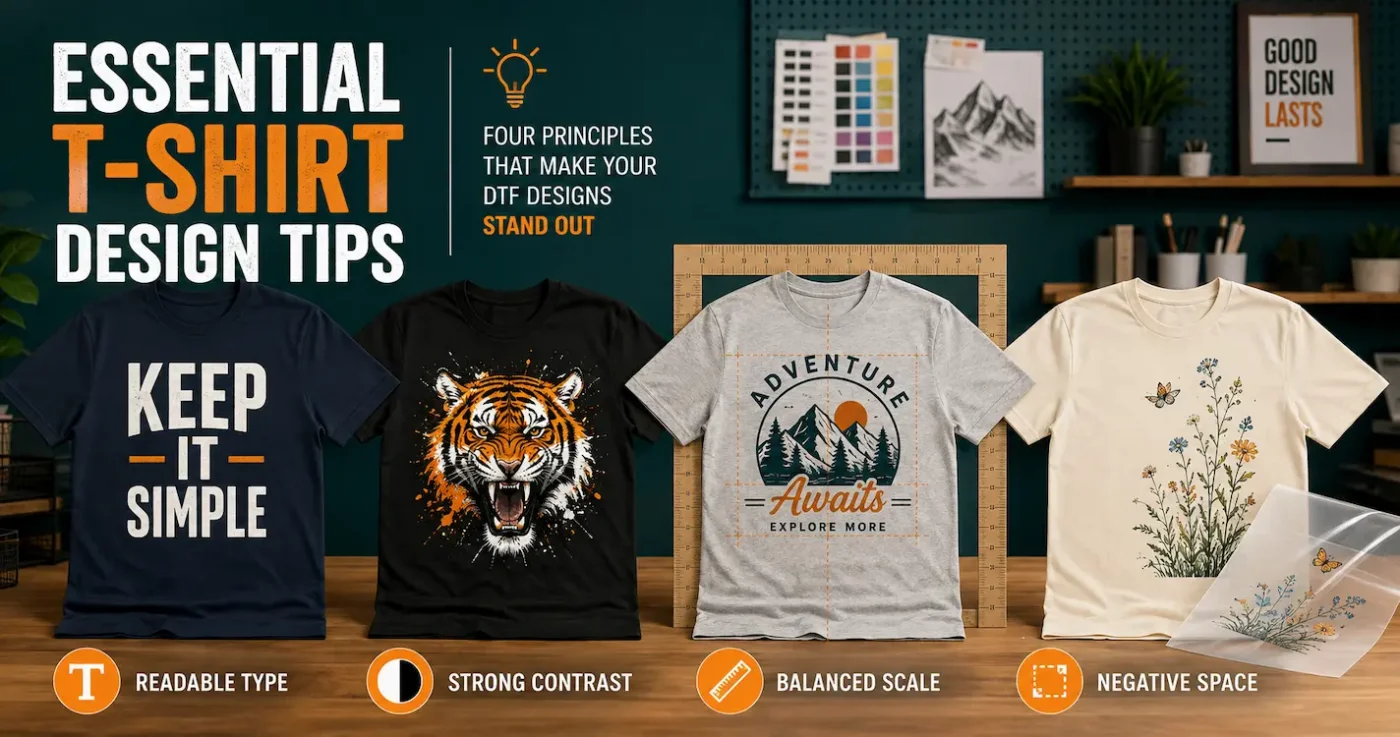
The best T-shirt designs are easy to understand, well proportioned and created for the garment—not just for a computer screen. A design can look impressive when enlarged on a monitor but become difficult to read, poorly positioned or uncomfortable when printed. Good typography, contrast, scale, spacing and negative space help turn attractive artwork into a T-shirt people will enjoy wearing.
Quick answer: Start with one clear idea, make the main message readable at a glance, design for the actual garment colour, choose the print dimensions before exporting, and view the artwork at its real printed size. For DTF transfers, avoid isolated details smaller than approximately 1 mm, use negative space to reduce large solid areas and test the finished design before production.
Contents
1. Start with the wearer and the purpose
Before selecting a font or drawing the first line, decide what the T-shirt needs to do. A staff uniform, fundraising shirt, fashion graphic, event souvenir and sports-club shirt all communicate differently.
Ask four questions:
- Who will wear it? Consider their age, interests, garment style and likely size range.
- Where will it be seen? A small indoor event allows more detail than a shirt intended to be recognised across a sporting field.
- What should people notice first? It might be a business name, event, illustration or short message.
- How should it feel? Professional, playful, premium, retro and urgent all call for different visual choices.
A clear brief makes every later decision easier. If the design tries to communicate five equally important ideas, none of them may be noticed.
2. Build a clear visual hierarchy
Visual hierarchy controls the order in which a viewer notices information. The most important element should normally be the largest, boldest or highest-contrast part of the design. Supporting information can then be smaller and quieter.
For a community event shirt, the event name may be the primary message, with the date and location as supporting information. For a brand shirt, the illustration might lead while the business name plays a secondary role.
A useful three-level structure
- Primary: the idea someone should understand immediately;
- Secondary: the element that adds meaning or context; and
- Detail: optional information for someone viewing the shirt more closely.
Step back from the screen or reduce the design to thumbnail size. If everything competes equally, simplify it. Removing an element can improve a design more than adding another one.
3. Make T-shirt typography readable
Typography is part of the artwork, not simply text added at the end. The typeface should support the mood while remaining readable at the intended print size.
- Use a bold or simple face for the main message when it must be read quickly.
- Keep decorative and script fonts for shorter words or supporting accents.
- Check the spacing between individual letters, lines and text blocks.
- Avoid stretching a typeface wider or taller; choose a font with the proportions you need.
- Limit the number of typefaces. One or two well-matched families are often enough.
- Make important differences obvious. Two fonts that are almost—but not quite—the same can look accidental.
Thin strokes and delicate script connections may look elegant on screen but become unreliable at small print sizes. For our DTF printing, avoid isolated details below 4 pixels or approximately 1 mm. Add suitable weight or simplify the lettering rather than relying on extremely fine lines.
Always proofread the final exported file, not only the editable document. Check spelling, dates, phone numbers and names at least twice. Once a supplied design is printed, a typo becomes part of the transfer.
4. Choose colours for the garment—not a white screen
Your garment colour is part of the composition. Artwork that looks balanced on a white canvas may disappear on a pale T-shirt or become visually heavy on black.
Use contrast deliberately
Light artwork generally stands out on a dark garment, while dark artwork is clearer on a light garment. Similar colours can create a subtle tonal result, but small text and critical details still need enough separation to remain visible.
Test the artwork against the actual shirt colour rather than a generic black or white mock-up. Two garments described as navy, charcoal or cream can look noticeably different.
Let the shirt colour do some of the work
On a black shirt, selected black areas can sometimes be removed from the artwork so the garment shows through. This can reduce the printed area and create a more integrated result. Only do this intentionally: the same transfer may look incomplete on a different garment colour.
Do not trust every screen
Computer monitors, phones and tablets emit light, while a printed transfer reflects it. Screen brightness, colour profiles, garment colour and surrounding light all change perception. If an exact brand colour matters, order and press a physical test before approving production.
Speciality finishes introduce additional colour considerations. Light colours are particularly important when creating glow-in-the-dark DTF artwork, because black and dark navy areas will not glow as strongly. Compare all current effects in our speciality DTF transfer guide.
5. Use negative space to improve comfort and appearance
Negative space is the open area within and around design elements. It helps separate information, direct attention and keep artwork from feeling crowded. With DTF printing, it also has a practical benefit.
A DTF transfer leaves a physical printed layer on the fabric. Large solid rectangles use more ink and adhesive, cover more fabric and can feel warmer than an open design. Removing an unnecessary background or building gaps into the artwork allows more of the garment to remain uncovered.
Instead of placing a photograph inside a large solid square, consider a shaped border, faded edge or carefully prepared cut-out where the artwork permits. Do not automatically remove every background—sometimes the rectangle is an intentional part of the design—but make the choice deliberately.
Practical test: Turn off the background layer in your design software. Any checkerboard area should represent genuine transparency. A white background is still printable artwork; it is not transparent.
6. Choose the print size before exporting
“Make it as large as possible” is rarely the best design instruction. Print dimensions should suit the artwork shape, garment style and intended look.
| Placement | Useful adult starting range | Design consideration |
|---|---|---|
| Left chest | Approximately 70–100 mm wide | Simplify fine text and detail; choose size by the artwork’s proportions |
| Centred chest | Approximately 150–250 mm wide | Useful for medium statements, logos and compact illustrations |
| Full front | Approximately 250–320 mm wide | Check negative space, garment width and how the print behaves when worn |
| Full back | Approximately 250–330 mm wide | Allow for the shirt’s side seams and avoid printing too close to the collar |
These are starting ranges, not fixed rules. A tall narrow design and a wide circular design can need different dimensions even when both are called a full-front print. Measure a real garment and cut a piece of paper to the proposed size before ordering.
A common starting point for a centred front or back design is to position its top roughly 50–80 mm below the collar seam. Garment cut, neckline, design height and desired style can all change that position. Use the collar to establish the garment centre, but judge the artwork on the complete shirt rather than following one measurement blindly.
7. Plan the position as part of the design
Placement changes how artwork feels. A compact centre-chest print can appear modern and restrained. A larger full-front graphic feels more like retail merchandise. A left-chest mark often suits workwear, uniforms and supporting branding.
Do not centre a print by measuring only from one side seam. T-shirts can twist or be sewn slightly unevenly. Establish the visual centre from the neckline and compare both sides before pressing.
Also check what lies beneath the pressing area. Pockets, zips, thick seams, buttons and hoodie drawcords can prevent even pressure. A design that is perfect on a flat T-shirt may require a new size or position on a hoodie. Our guide to DTF transfers on hoodies and sweatshirts covers these practical issues.
8. Adapt the artwork for different garment sizes
One transfer size will not look identical on every garment. A print designed for an adult large can overwhelm a child’s shirt and appear small on a 4XL garment.
You do not necessarily need a separate transfer for every clothing size. Many orders work well with two or three print groups, such as youth, standard adult and larger adult. The right grouping depends on the artwork, garment measurements and desired visual consistency.
When scaling down, check the smallest text, outlines and isolated details again. Reducing the complete design also reduces every stroke within it. A simplified youth version can be more successful than shrinking the adult artwork until it becomes fragile or unreadable.
9. Prepare print-ready artwork
Once the visual design is resolved, prepare the file for production. For our DTF transfer service, supply:
- a PNG with a genuinely transparent background;
- 300 DPI at the final intended print size;
- a tightly cropped canvas without unnecessary transparent space;
- a file no larger than 254 MB; and
- no isolated element smaller than 4 pixels or approximately 1 mm.
Do not enlarge a small web image and expect the software to recreate missing detail. AI upscaling can sometimes improve a source file, but it can also invent edges, alter lettering and add artefacts. Inspect the entire result at 100% before using it.
Canva, Photoshop, Illustrator, CorelDRAW, Affinity and free browser-based editors can all create useful artwork. The software does not guarantee the result—the final file still needs correct dimensions, resolution and transparency. Our Photopea DTF artwork guide provides step-by-step technical help.
Use original or properly licensed artwork
Images found through Google, Pinterest or social media are not automatically free to print or sell. Create original artwork or confirm that you hold the required commercial licence. Be especially careful with brand logos, sports teams, musicians, film characters and artwork copied from another T-shirt seller.
AI-generated artwork also needs human checking. Look for misspelt words, inconsistent shapes, unwanted backgrounds, visual artefacts and elements too small to print. AI can help develop an idea, but you remain responsible for the final design and your right to use it.
10. Test the design before production
A mock-up is useful for planning, but it cannot fully reproduce print size, fabric texture, colour or hand feel. Before ordering or pressing a large run:
- print the design on paper at its actual dimensions;
- place it on the intended garment and view it from several distances;
- check the smallest text and details;
- confirm contrast against the real shirt colour;
- press a sample using the actual garment and heat press;
- inspect the placement, feel and colour; and
- perform wear and wash testing when producing items for sale.
Testing is essential for speciality finishes. It is also important for polyester, coated fabrics and unfamiliar garment styles. We print files as supplied as part of a budget service; customers are responsible for artwork choices, spelling, sizing, placement and testing.
Common T-shirt design mistakes to avoid
| Common mistake | Better approach |
|---|---|
| Too many messages, fonts or effects | Choose one primary idea and build a clear hierarchy around it |
| Designing only on a white digital canvas | Preview and test against the actual garment colour |
| Using very thin lines and tiny lettering | Simplify or add weight at the final print dimensions |
| Leaving an accidental rectangular background | Use true transparency and inspect the exported PNG |
| Making every adult and youth print the same size | Create sensible size groups and check every scaled version |
| Filling the entire print area with solid ink | Introduce negative space where it supports the design |
| Copying an online image without checking rights | Use original or properly licensed commercial artwork |
Once the artwork is ready, a well-planned DTF gang sheet can combine different sizes or repeat designs efficiently. Review our DTF transfer tips and tricks before pressing, or compare our current ready-to-press transfer options.
Frequently asked questions about T-shirt design
What makes a good T-shirt design?
A good T-shirt design has one clear idea, readable typography, sufficient contrast, balanced composition and a print size suited to the garment. It should also remain practical and comfortable when printed.
What resolution should DTF artwork be?
Supply artwork at 300 DPI at the final print dimensions. DPI alone cannot rescue a small or blurry source image; the file needs enough real pixel detail for its intended size.
What file type should I supply?
For our DTF transfer service, supply a high-resolution PNG with a genuinely transparent background. Crop the canvas closely and keep the file within the stated upload limit.
How large should a full-front T-shirt design be?
Approximately 250–320 mm wide is a useful adult starting range, but the correct size depends on the design shape, shirt measurements, wearer and intended style. Print a paper template at actual size before deciding.
How far below the collar should a design sit?
For many centred front or back prints, placing the top about 50–80 mm below the collar seam is a useful starting point. Adjust for the neckline, garment size, design height and desired appearance.
Should I use the same transfer size for every shirt?
Not always. One size can work across a limited adult range, but youth and very large garments often look better with a different print size. Two or three size groups may provide better consistency.
Why is negative space helpful in a DTF design?
Negative space improves visual clarity and leaves more garment fabric uncovered. This can make a large DTF print feel lighter and more breathable than a solid rectangular block.
Can I use artwork found through Google Images?
Finding an image online does not grant permission to print or sell it. Use artwork you created or assets carrying an appropriate commercial licence.
Does DTF Transfers Australia check my design?
Our budget service prints the file supplied. Customers must check spelling, artwork quality, dimensions, transparency, colours, placement and suitability before ordering and should test before production.
